
This past week I started playing around with Azure Functions. They offer an inexpensive way to get started with microservices and serverless architecture in Azure.
Essentially, they allow the developer to write small, loosely coupled services using infrastructure that is completely maintained by the cloud service provider. There is no need to worry about scaling of your Functions or OS patching as the cloud service will handle both of these concerns for you.
Getting Started#
The most simple way to get started doesn’t require an Azure subscription. Just head over the Azure Functions page and click the “Try if for free” button. Then click the “Webhook + API” button and choose your language (for this demo I’ve chosen C#). Once the setup is done you have a fully functional Webhook.
Testing Your Webhook#
Prerequisite: download Postman.
At this point you can use the portal to send in HTTP requests or you can use Postman. To use the portal just click on the “Test” link to the right side of the code editor. Change the name parameter to your name and click run. You should see “Hello %YourName%”.
Next, let’s use Postman. Grab the URL from “Get Function URL” above the code editor. Open Postman, change the HTTP verb to “POST”, paste the URL, add a Content-Type: application/json header, and in the Body tab (raw) paste:
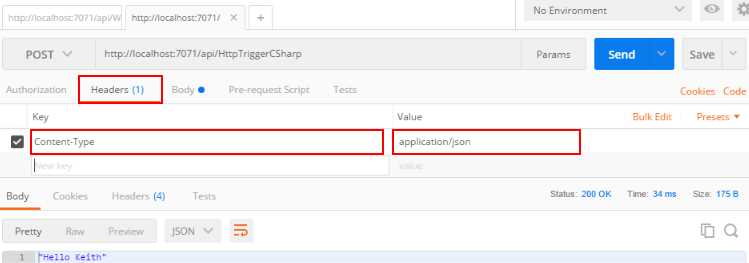
{ "name": "Keith" }Hit Send and you should see “Hello Keith”!
Using Your Azure Subscription#
If you have an Azure subscription, create a Functions App through the Azure Portal. Create a new HttpTrigger Function and test it the same way.
Conclusion#
While our newly created Webhook doesn’t do a whole lot we have shown how easy it is to get started with Azure Functions.